AI for home service businesses: what it does for contractors

AI for home service businesses comes in five kinds today: call answering tools, AI features inside field service and accounting apps, estimating and measurement tools, general assistants such as ChatGPT and Claude, and an assistant that works across your apps for the whole team. Each fits different office jobs, and none of them replaces pricing judgment, licensed work or a person approving money and customer messages. Alvin is the fifth kind: one assistant the team asks, which does the work in the apps you already use and waits for approval.
On this page
The five kinds of AI for contractors today
1. Call answering tools. These pick up the phone when the office cannot, hold a spoken conversation, capture the caller's details, and often book into the schedule. They suit after-hours and overflow calls. Quality depends on setup: your service area, your prices, what counts as an emergency. See AI receptionist vs answering service for how they compare with a live service.
2. AI inside field service and accounting apps. ServiceTitan, Housecall Pro, Jobber, QuickBooks and others have added AI features to their own products: summaries, drafted replies, suggested categories, reports from a typed question. These are convenient because they sit where the data is. Their limit is the edge of the app. Features differ by product and plan, so check each vendor's site.
3. Estimating and measurement tools. Aerial roof measurements, photo-based takeoffs, plan readers, load and layout helpers. They save a site visit or an hour with a tape and a calculator. A person with the license and the experience still reviews the output before it becomes a price.
4. General assistants. ChatGPT, Claude and similar products are good at writing and thinking work: rewording an estimate cover letter, drafting a job ad, summarizing a long email thread, explaining a spreadsheet. Out of the box, a general assistant does not know your customers or your prices, and one person uses it at a time.
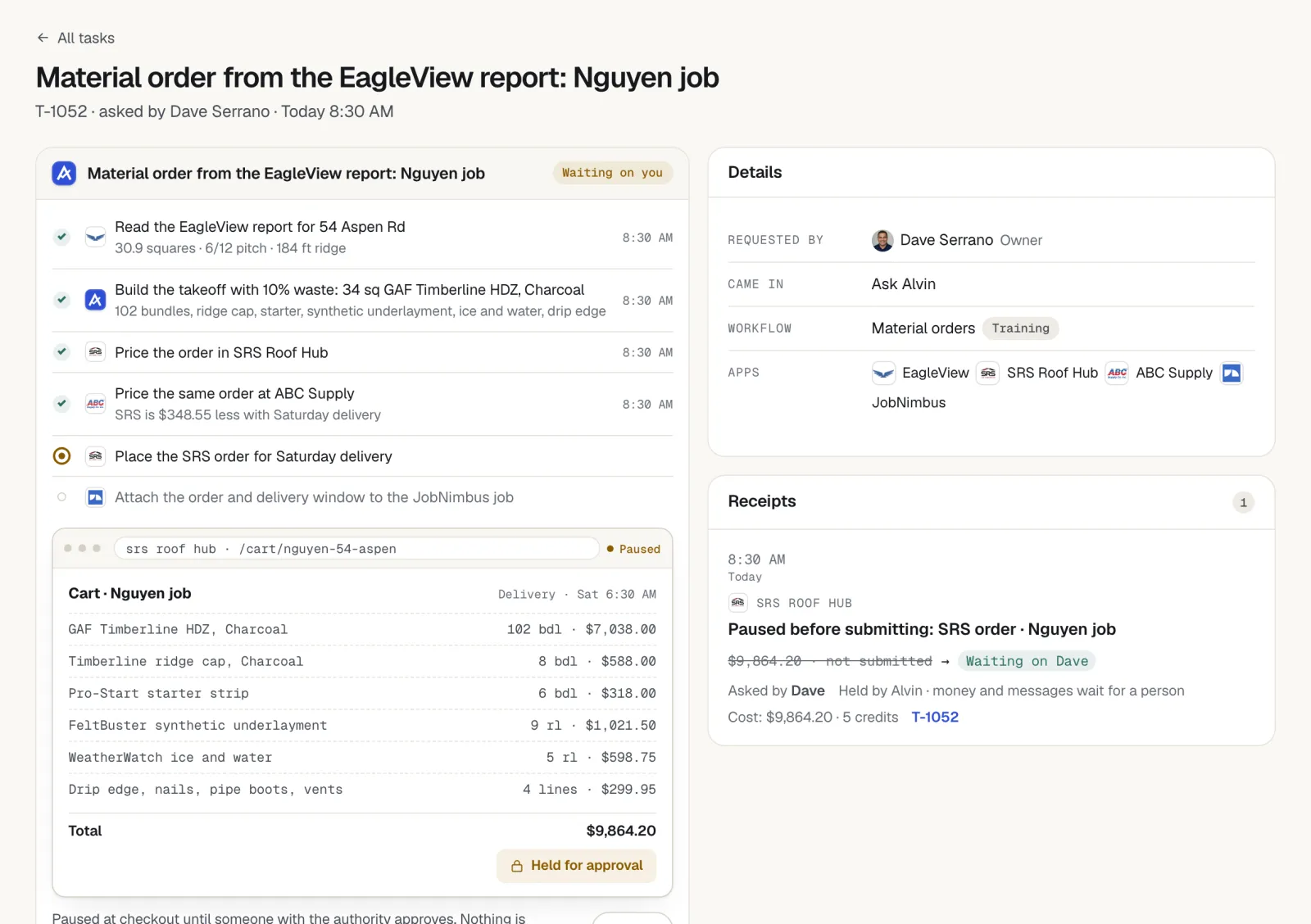
5. An assistant that works across apps for the whole team. This is where Alvin sits. The team asks Alvin in the Alvin app or forwards an email. Alvin does the work in QuickBooks, the CRM or field service app, supplier and manufacturer portals, permit portals, email and Google Business Profile. Each person has a role and limits. Anything that spends money or goes to a customer waits for approval.
Which tool fits which office job
Scroll sideways to see every column.
| Office job | Kind of tool that fits | What a person still does |
|---|---|---|
| Answering calls after hours | Call answering tool or live answering service | Takes the emergencies and hard calls |
| Writing a tricky customer email | General assistant | Checks the facts and sends it |
| Roof or site measurements | Estimating and measurement tool | Verifies and prices the job |
| Dispatch suggestions and job summaries | AI inside the field service app | Makes the schedule decisions |
| Categorizing transactions | AI inside the accounting app | The bookkeeper reviews and closes the month |
| Following up on estimates and unpaid invoices | Assistant across apps, or the CRM's built-in sequences | Approves messages and makes the phone calls |
| Material orders through a supplier portal | Assistant across apps | Approves the cart and stays the buyer |
| Permit applications, warranty registrations, rebate forms | Assistant across apps | Signs, pays and answers code questions |
| Review requests and replies | CRM feature or assistant across apps | Approves replies and calls unhappy customers |
| Keeping the CRM and the books in agreement | Assistant across apps | Resolves the mismatches that need judgment |
Most shops end up with more than one kind. A call tool on the phones and an assistant on the paperwork overlap very little.
Where to start
- List the work that waits. For one week, write down every office task that got done late or not at all. The usual list: estimate follow-up, invoice reminders, permits, registrations, supplier orders, review requests.
- Pick one that is frequent and boring. Something that happens many times a week and follows the same steps each time.
- Check what you already own. Your field service or accounting app may include a feature for it. Turn that on first.
- Write down the rules. Who approves, the dollar limit, the hours messages may go out, the wording you like. A tool needs these, and so would a new hire.
- Run it with approvals on. For the first month, a person looks at every outgoing message and every order.
- Review the record. At month end, read what was done. Keep what worked, tighten the rules where it did not, then add the next task.
Avoid buying four tools in one month. Each one needs setup, and a half-configured tool makes more work for the office.
What to keep human
- Pricing. Software can pull costs and fill in a price book. The margin and the number on the proposal are the owner's decision.
- Licensed work. Load calculations, code decisions, pesticide application decisions, gas and electrical work, anything requiring a license or a signature.
- Insurance claim negotiation. Documentation can be prepared by software. Negotiating a claim is regulated in many states and belongs with the licensed person.
- Approvals on money. Orders, refunds, permit fees, payment links. A named person approves, within limits the owner sets.
- Approvals on customer messages. Especially prices, apologies and anything about a dispute.
- The hard conversations. An upset customer, a crew problem, a collections call.
This article is general information, not legal, tax or insurance advice. Licensing, claim handling and texting rules vary by state. Check the rules that govern your trade.
Questions to ask any vendor
- Who approves? Can the tool spend money or message a customer without a person approving, and can you set limits by role?
- Is there a record of every action? Can you see who asked, who approved and what changed, and can the record be edited afterward?
- Where do logins live? Does staff, or the vendor's staff, see your passwords? What happens to access when an employee leaves?
- Can the whole team use it? Or is it one seat for one person, with everyone else left out?
- Which of our apps does it work in? Ask about the exact products you use, and what happens where there is no direct connection.
- What does it not do? A vendor who cannot name the limits has not tested them.
- Who is the merchant of record? When money moves, is it your account or theirs?
- What does it cost at our volume? Ask for the price with usage included.
AI tools by trade
The office jobs differ by trade, so the right tools do too. Each guide below maps the kinds above to one trade's paperwork:
- AI tools for roofing companies: measurements, supplements paperwork, material orders, warranty registration.
- AI tools for HVAC companies: maintenance plan renewals, parts orders, rebate and warranty paperwork.
- AI tools for plumbing companies: emergency call coverage, dispatch, permits, invoice follow-up.
- AI tools for electrical contractors: estimates, permit and utility paperwork, change orders.
- AI tools for landscaping companies: recurring billing, crew schedules, seasonal upsells.
- AI tools for pest control companies: route billing, renewals, service records.
What Alvin handles and what stays with you
| Alvin does | You do |
|---|---|
| Takes requests from the whole team in the Alvin app or by forwarded email, each person under a role and limits | Set the roles, the limits and who approves |
| Works in QuickBooks, your CRM or field service app, supplier and permit portals, email and Google Business Profile | Keep using the apps you already have |
| Uses a browser with logins saved in the vault where there is no direct connection; staff never see the passwords | Save the logins once and remove access when someone leaves |
| Holds orders, invoices, payment links, refunds and customer messages for approval | Approve, edit or reject; the business stays buyer and merchant of record |
| Runs scheduled checks: unpaid invoices, stale estimates, renewals, registration deadlines, a morning briefing | Make the calls and decisions those checks raise |
| Keeps a receipt for every action with screenshots, and remembers customers, jobs and prices in a memory the team can edit | Price the work and do everything that needs a license |
Alvin has no phone line today and does not answer or make calls, so pair Alvin with a call answering option if the phones are the problem. Alvin's plans are Standard at $99 a month and Pro at $299 a month, plus usage in credits.
Frequently asked questions
How can AI help a home service business?
AI helps most with office communication and paperwork: answering calls after hours, drafting messages, following up on estimates and invoices, placing material orders for approval, and filing permits and registrations. It does not do the trade work or set your prices. Start with one frequent, repetitive task and keep a person approving.
What is the best AI for contractors?
It depends on the job. Call answering tools fit the phones, features inside your field service or accounting app fit work that stays in that app, general assistants fit writing, and an assistant that works across apps fits follow-up and paperwork that spans several systems. Many contractors use two kinds together.
Can ChatGPT or Claude run my contracting office?
A general assistant is useful for drafting and summarizing, but out of the box it does not know your customers or prices and usually serves one person at a time. Running office work also needs approvals, a record of actions and safe handling of logins. Ask any tool how it covers those three.
Is it safe to give AI access to my business apps?
It can be, if three things are true: a person approves anything that spends money or reaches a customer, every action is recorded, and logins are stored so staff and the vendor's people never see them. Ask each vendor to show you all three before you connect anything.
Will AI replace my office manager?
No. It takes the repetitive entering, filing and following up, which leaves the office manager more time for customers, scheduling judgment and the problems that need a person. Someone still has to set the rules and approve the work.
Start with one task and keep the approvals.
In a pilot we connect Alvin to your apps, pick one piece of office work with you, and run it with a person approving every step.