AI for plumbers: where AI helps a plumbing company today

AI for plumbers is useful today in the office work that surrounds a job: replying to emergency leads quickly, keeping the dispatch board and the customer informed, preparing permit and inspection paperwork, building parts orders, following up on unpaid invoices and asking for reviews. The plumbing itself, the price and every code decision stay with licensed people. Alvin does that office work across the apps a plumbing company already uses, and a person approves anything that spends money or goes to a customer.
On this page
Where AI for plumbing companies fits, stage by stage
Follow one job. Mrs. Henderson's water heater fails on a Sunday night. Here is every office step between her first message and the paid invoice, and what software can take on.
Scroll sideways to see every column.
| Stage | What AI tools can do | Who decides |
|---|---|---|
| The lead arrives | Answer or text back, collect address and problem, flag an emergency | On-call plumber decides whether to roll tonight |
| Booking | Offer open slots, create the job, confirm with the customer | Dispatcher owns the board |
| Permit | Prepare the application from the job, track status | License holder signs and answers code questions |
| Parts | Build the supply-house cart from the job notes | Someone with spending authority approves |
| Inspection | Request the inspection, tell the customer the date | Plumber meets the inspector |
| Invoice | Draft the invoice, send it once approved, remind if unpaid | Owner sets terms and handles disputes |
| After the job | Ask for a review, log warranty details | Owner replies to unhappy customers |
Emergency leads and the first reply
A burst pipe does not leave a voicemail and wait. The customer keeps dialing until someone answers. So the first tools most plumbing shops try are the ones aimed at the phone and the inbox: an AI receptionist that picks up, or a text sent automatically after a missed call.
The comparison of AI receptionists and answering services covers the trade-offs. Two tests matter for plumbing in particular:
- Does it recognize an emergency? Water through a ceiling, sewage backing up and a gas smell at the water heater need a person now, plus the right first instruction (shut the main, leave the house and call the gas utility).
- Does the job land in your system? A lead that sits in a separate inbox until Monday is still a missed lead.
Dispatch and the schedule
Many field service apps, including the ones plumbing shops commonly run (ServiceTitan, Housecall Pro, Jobber and others), now advertise AI features. Check what your own app offers for scheduling and dispatch before buying anything separate.
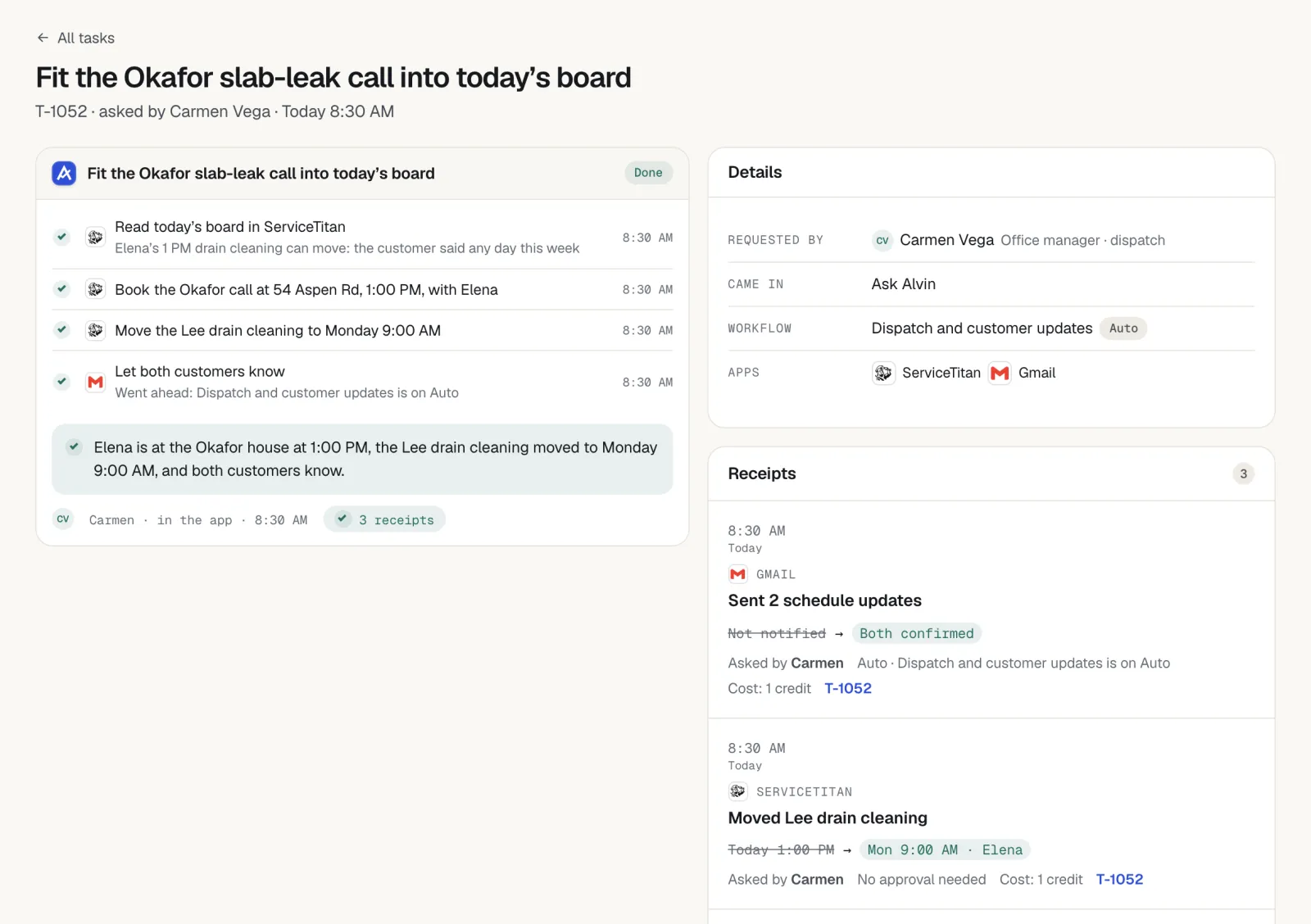
What helps a dispatcher most is rarely clever routing. What helps is having the small chores done: the arrival text sent, the customer told when the plumber is running 40 minutes behind, the second visit booked when a part has to be ordered, the callback list worked. Those are message-and-update tasks, which software handles well.
The dispatch board itself should stay in human hands. Who goes to which job depends on skill, on who knows that building, and on which customer has already been rescheduled twice.
Permits and inspections paperwork
A water heater swap, a repipe or a sewer line replacement often needs a permit and at least one inspection. The requirement, the fee and the portal differ from city to city, and one shop may work in six jurisdictions.
The paperwork is a good fit for software because the facts are already on the job: address, owner, scope, equipment, valuation. A tool that can use a city's permit portal can fill in the application, save a copy and check the status each morning. Software has no business deciding whether a permit is required, what the code calls for, or signing as the license holder.
General information, not legal advice. Permit and inspection requirements are set by your state and local jurisdiction. Confirm with the building department that governs each job.
Parts orders, invoices and reviews
Parts orders. The plumber's note says "50 gal gas, atmospheric vent, needs expansion tank and new flex". Turning that into a cart at the supply house, with the right brand and today's price, takes a person ten minutes they do not have. Software can build the cart and stop. A person approves the spend.
Invoice follow-up. Many unpaid plumbing invoices were simply forgotten. A reminder with the invoice number, the amount and a payment link, sent from the real aging report, gives the customer an easy way to pay. The schedule and wording are in the guide to invoice follow-up.
Reviews. The request works best the same day, from the business's own number, naming the plumber who did the work. Review platforms have their own rules about who you may ask and what you may offer, so read them.
How to try AI in a plumbing shop
- Write down where the week goes. Have the office keep a tally for five days: calls missed, invoices chased, permits filed, parts runs.
- Pick the biggest pile. One task, not six.
- Ask the vendor hard questions. Which apps does it work in? Who approves? Where is the record of what it did? How are logins stored? What does it do when it is unsure?
- Run it with approval on everything. Read every message before it goes out for the first two weeks.
- Check the texting rules. Consent and opt-out rules apply to business texts. See the notes on texting rules for contractors.
- Loosen limits slowly. Let routine reminders go under a limit you set. Keep orders, refunds and anything unusual behind a person.
What Alvin handles and what stays with you
Everyone on the team asks the same Alvin, in the Alvin app or by forwarding an email, each with a role and limits. Alvin works in QuickBooks, your field service app, supply-house sites, city permit portals and your email, using a browser with logins saved in the vault where there is no direct connection.
| Alvin does | You do |
|---|---|
| Turns a forwarded lead email or web form into a job and drafts the reply, held for approval | Answer the phone. Alvin has no phone line today and does not take or make calls. |
| Drafts arrival, delay and reschedule messages from your own accounts | Run the dispatch board and approve the messages |
| Fills in permit applications on the city portal and tracks status and inspection dates | Decide what needs a permit, sign as license holder, approve the fee |
| Builds the parts cart at the supply house from the job notes | Approve the order. Your business is the buyer. |
| Checks QuickBooks for unpaid invoices and drafts reminders with the payment link | Set terms and handle disputes |
| Drafts review requests after completed jobs | Reply to reviews that need the owner's voice |
| Keeps a receipt for every action, with screenshots | Diagnose, price and do the plumbing |
Alvin never holds or moves money, and makes no code or licensing decisions. Standard is $99 a month and Pro is $299 a month, plus usage in credits.
Frequently asked questions
How can plumbers use AI?
Plumbers use AI mainly for office work: replying to leads, sending appointment and delay messages, preparing permit applications, building parts orders, reminding customers about unpaid invoices and asking for reviews. Some also use a general assistant such as ChatGPT or Claude to draft emails and job descriptions.
Will AI replace plumbers?
No. AI tools work with words, forms and schedules. Finding a leak, sweating a joint, sizing a water heater and passing an inspection take a trained, licensed person on site. What changes is how much of the office work around the job a person has to do by hand.
Can AI answer emergency plumbing calls?
AI receptionist products can answer calls, collect details and pass an emergency to the on-call plumber. Test any product with real emergency scenarios before relying on it. Alvin does not answer calls. Alvin handles the work that follows a call or message.
Can AI pull plumbing permits?
Software can prepare and submit the application on a city portal and track its status, using the job details and the company's own login. Whether a permit is required, what the code demands and the license holder's signature remain human responsibilities. Rules differ by jurisdiction.
What AI tools should a small plumbing company start with?
Start with the one task that costs the most hours or the most lost jobs, often missed leads or unpaid invoices. Check whether your field service app already covers it. Then run any new tool with a person approving every message and order until you trust the results.
Give the office its evenings back.
Alvin handles the permits, parts orders, invoice reminders and customer updates around each plumbing job, with your approval where it counts.