AI for a landscaping business: what works in the office today
AI for a landscaping business falls into five groups today: design and estimating tools, AI features inside field service apps, call answering tools, general assistants such as ChatGPT and Claude, and assistants that do office work across all your apps for the whole team. AI is useful now for paperwork (billing checks, rescheduling messages, proposals, invoice follow-up) and does not replace walking a property or managing a crew. Alvin is the fifth kind: one assistant the whole team asks, working in the apps you already use, with a person approving anything that spends money or reaches a customer.
On this page
The five kinds of AI for lawn care companies
Scroll sideways to see every column.
| Kind of tool | What it is good at | Where it stops |
|---|---|---|
| Design and estimating tools | Measuring a property from aerial images, rendering a design, producing a takeoff | Works inside its own product. Does not know your prices unless you load them. |
| AI inside field service apps | Drafting messages, summarizing notes, suggesting schedules, inside that one app | Sees only what is in that app. |
| Call answering tools | Picking up when the office cannot, taking a message, booking an estimate visit | Handles the call. The follow-through still falls to the office. |
| General assistants (ChatGPT, Claude) | Writing, rewording, explaining, working through a spreadsheet you paste in | One person at a time. You copy information in and copy the answer out. |
| An assistant across your apps (Alvin) | Doing the multi-step office task in QuickBooks, your field service app, email and portals | Waits for approval on money and customer messages. No phone line. No field work. |
These overlap, and most companies will end up with two or three. Features and prices change often, so check each vendor's site before you decide.
Design and estimating tools
This is where AI is most visible in landscaping. Some tools measure turf, beds and hard surfaces from aerial or satellite images so you can price a mowing account without a site visit. Others turn a photo of a front yard into a rendering with plants and a patio dropped in, which helps a homeowner picture the job.
Use them for speed on the first number, then check. Aerial measurements miss what is under tree cover, and they do not show the slope, the narrow gate or the wet corner. A rendering is a sales picture, not a planting plan. The estimate still needs your production rates and your prices behind it. If you have not worked those out, start with the landscaping pricing guide.
AI inside field service apps, and call answering
Vendors of field service and landscape business software (the category that includes Jobber, LMN and Aspire) have been adding AI features, such as drafting a reply to a customer, writing up job notes or answering questions about your own data. What each product offers differs and changes often, so check your vendor's site. If your team lives in one of these apps and it has such features, turn them on and try them. They are usually the cheapest AI you can get, because you already pay for the app.
The limit is the edge of the app. A feature inside your scheduling software cannot check what was billed in QuickBooks, read the vendor's email or log in to the nursery's portal.
Call answering tools are a separate category. Spring call volume is more than most offices can pick up, and a missed call for a new maintenance account is a missed season of revenue. These tools answer, ask a few questions and pass along a message or book a visit. Compare them with a live answering service in AI receptionist vs answering service. Listen to recordings in the first weeks, and make sure someone owns the callbacks.
General assistants: ChatGPT and Claude
For the cost of a subscription, a general assistant will do a lot of writing for one person at a desk:
- Turn rough site notes into a clean proposal description.
- Write the price increase letter you have been putting off.
- Draft a reply to an upset customer, in a calmer voice than you feel.
- Explain a clause in a commercial bid package in plain words.
- Build a spreadsheet formula for your crew hour cost.
What it does not do is act. It will write the rain-day message but will not look up which 43 customers are on Tuesday's route, send it and move the visits. It does not remember last week unless you tell it again, and each person on your team has a separate conversation. Check any plant, chemical or legal answer against a source you trust, because general assistants can be confidently wrong.
What to hand over first
Start with office jobs that are repetitive, checkable and currently done late. Four that fit most landscaping companies:
- Recurring billing checks. Each month, compare what was invoiced to what each maintenance agreement says, and list the differences: a price that was never updated after renewal, a cleanup done and not billed, a cancelled account still being invoiced.
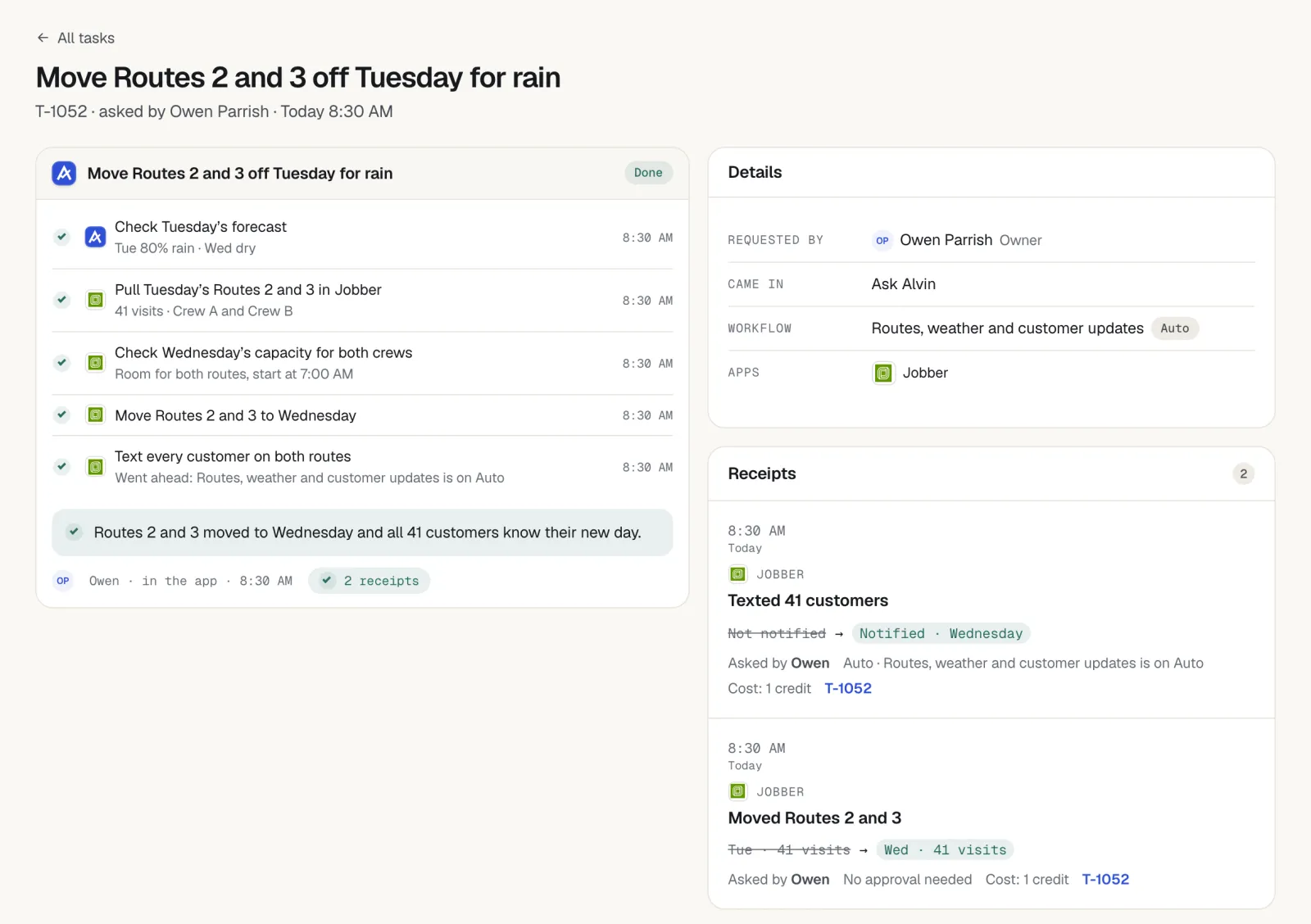
- Rain-day rescheduling messages. When a route is rained out, draft the message to that day's customers with the new day, for one person to approve and send.
- Seasonal proposals. In late winter and late summer, draft aeration, mulch, cleanup and enhancement proposals for existing customers from last year's work and your current prices.
- Invoice follow-up. A weekly pass through overdue invoices with a polite reminder drafted for each, stopped as soon as a payment posts.
Hand over one at a time. Check the output closely for a month before adding the next. More detail on the first one is in recurring billing for landscapers.
What stays human
- Walking the property. Drainage, soil, shade, access and what the customer really wants.
- Design decisions and plant selection for the site and climate.
- Pesticide and fertilizer decisions. These belong to the licensed applicator.
- Pricing strategy: your rates, margins and which work you turn down.
- Crew management: hiring, training, safety and quality checks.
- Hard conversations: a damaged irrigation line, a dead tree, a commercial client threatening to leave.
- Approval of anything that spends money or goes out under your name.
What Alvin handles and what stays with you
Alvin is one assistant for the whole team. The owner, office manager, crew leads and bookkeeper each ask in the Alvin app or forward an email, with a role and limits for each person. Alvin works in the apps you already use. Where there is no direct connection, Alvin uses a browser with logins saved in your vault, and staff never see the passwords.
| Alvin does | You do |
|---|---|
| Compares recurring invoices in QuickBooks to the agreements in your field service app and lists mismatches | Decide which mismatches to correct and approve the corrected invoices |
| Drafts rain-day messages for the affected route, as texts and emails from your accounts | Call the rain day and approve the message |
| Drafts seasonal proposals from past work and your price sheet | Review scope and price, and walk any property that needs it |
| Runs scheduled checks on unpaid invoices, stale estimates and renewals, and sends a morning briefing | Pick up the phone when a person is needed |
| Keeps a receipt for every action: who asked, who approved, what changed, with screenshots | Set each person's role and spending limits |
Alvin has no phone line today, so calls stay with your office or a call answering tool. Alvin never holds or moves money. Standard is $99 a month and Pro is $299 a month, plus usage in credits.
Frequently asked questions
How can AI help a landscaping business?
Mostly in the office. AI can measure properties from aerial images, draft proposals and customer messages, check recurring invoices against contracts, follow up on unpaid invoices and answer calls the office misses. It does not replace site visits, design judgment or crew management.
What is the best AI for lawn care companies?
It depends on the job. Use a measuring or design tool for faster estimates, the AI features in your field service app for work inside that app, a call answering tool for missed calls, and an assistant that works across your apps for multi-step office work. Check each vendor's current features and pricing.
Can ChatGPT write landscaping estimates?
ChatGPT or Claude can turn your notes into a well-worded proposal and help with the math if you supply your rates and measurements. It does not know your costs, your past jobs or the property unless you paste them in. A person should check every number before it goes to a customer.
Will AI replace the office manager at a landscaping company?
No. AI takes repetitive tasks such as billing checks, reminders and first drafts. The office manager still handles customers, exceptions, crews and judgment calls, and approves what goes out.
Does Alvin answer phone calls for landscapers?
No. Alvin has no phone line today. Alvin works in your apps and by email, drafts texts and emails from your own accounts, and holds them for a person to approve.
Start with one office job.
Hand Alvin the monthly billing check or the rain-day messages and see the receipts. See what Alvin handles for landscaping companies.