AI for HVAC companies: what AI HVAC software does today

AI for HVAC companies comes in four kinds today: AI features built into field service apps, tools that answer and book calls, general assistants such as ChatGPT and Claude, and assistants that do office work across all of a shop's apps. None of them diagnoses equipment or sets your prices. Where they earn their keep is the repeat office work: renewals, warranty registrations, parts orders and invoice follow-up. Alvin is the fourth kind, one assistant the whole team shares, with a person approving anything that spends money or reaches a customer.
On this page
The four kinds of AI HVAC software
Scroll sideways to see every column.
| Kind | What it does well | Where it stops |
|---|---|---|
| AI inside a field service app | Works on data already in that app: call summaries, job notes, scheduling suggestions, reporting | Stays inside that app. Supplier portals, manufacturer sites and utility programs are outside it. |
| Call answering and booking tools | Pick up when the office cannot, collect the details, book or take a message | The work the call creates still needs someone to do it |
| General assistants (ChatGPT, Claude) | Drafting, summarizing, explaining, spreadsheet help, for one person at a time | Not set up with your team's roles, approval limits or a record of each action |
| An assistant across your apps (Alvin) | Carries a task through several systems for the whole team, with approvals and receipts | No phone line today, and no licensed or technical decisions |
These overlap, and most shops end up with more than one. Products change quickly, so check each vendor's own site for what the product does this month.
Field service app features and call answering tools
Inside your field service app. If you run ServiceTitan, Housecall Pro, Jobber or a similar app, look there first. The data is already in one place, there is nothing new to log in to, and your team knows the screens.
The limit is the edge of the app. An HVAC office spends much of its day in places the field service app does not reach: the distributor's ordering site, a manufacturer's warranty registration page, the utility's rebate portal, the city permit site, QuickBooks, the inbox. A feature that summarizes a call does not register the condenser that was installed on that job.
Call answering and booking. These tools answer the phone with a synthetic voice or reply to a missed call by text. They ask what is wrong, capture the address and either book a slot or pass a message to the on-call technician. For a shop losing no-cool calls at 7pm in July, that is a real gap closed. The options for after-hours coverage are worth comparing side by side.
Test them the way a customer would. Call with a furnace that smells of gas and see whether the tool gives the right safety instruction and reaches a person. Call as an existing maintenance member and see whether the tool knows that.
General assistants like ChatGPT and Claude
A general assistant is a good writing and thinking partner. Owners use them to rewrite a job description, draft a reply to a difficult review, turn rough notes into a maintenance agreement outline, or make sense of a profit and loss report.
They are built around one person and one conversation. A shop needs more than that: a crew lead who may order parts up to a limit, an office manager who may send invoices, a bookkeeper who sees the books, and a record of who did what. You can paste information in and copy answers out, but the doing stays with you.
What to hand over first
Start with work that is frequent, rule-based and annoying, where a mistake is caught by a person before it matters.
- Maintenance agreement renewals. Who is due, who has no visit booked, who lapsed last month. The list changes daily and nobody enjoys keeping it. See how renewals lapse.
- Warranty registrations. Each install has a deadline, and the information is already on the job.
- Parts orders. Building the cart from the job notes, checking stock at the supply house and getting it in front of someone to approve.
- Invoice follow-up. Polite reminders on unpaid invoices, taken from the real aging report in QuickBooks.
- Stale estimates. Replacement quotes with no reply after a few days.
Hand over one at a time. Run it for two weeks with a person approving everything, read what goes out, then loosen the limits where you are comfortable.
What stays human
- Diagnosis. A technician with gauges and a meter finds the fault. Software reading a symptom list does not.
- Sizing and equipment selection. Load calculations and code questions belong to your licensed or qualified person.
- Pricing decisions. Software can do the arithmetic on a price book. The owner decides the rate, the margin and the discount.
- Approvals. Money going out and messages going to customers get a person's yes.
- Safety calls. Gas smells, carbon monoxide alarms and electrical burning smells go to a person and to emergency guidance, immediately.
- The hard conversation. A callback, a complaint, a customer who cannot afford the repair.
What Alvin handles and what stays with you
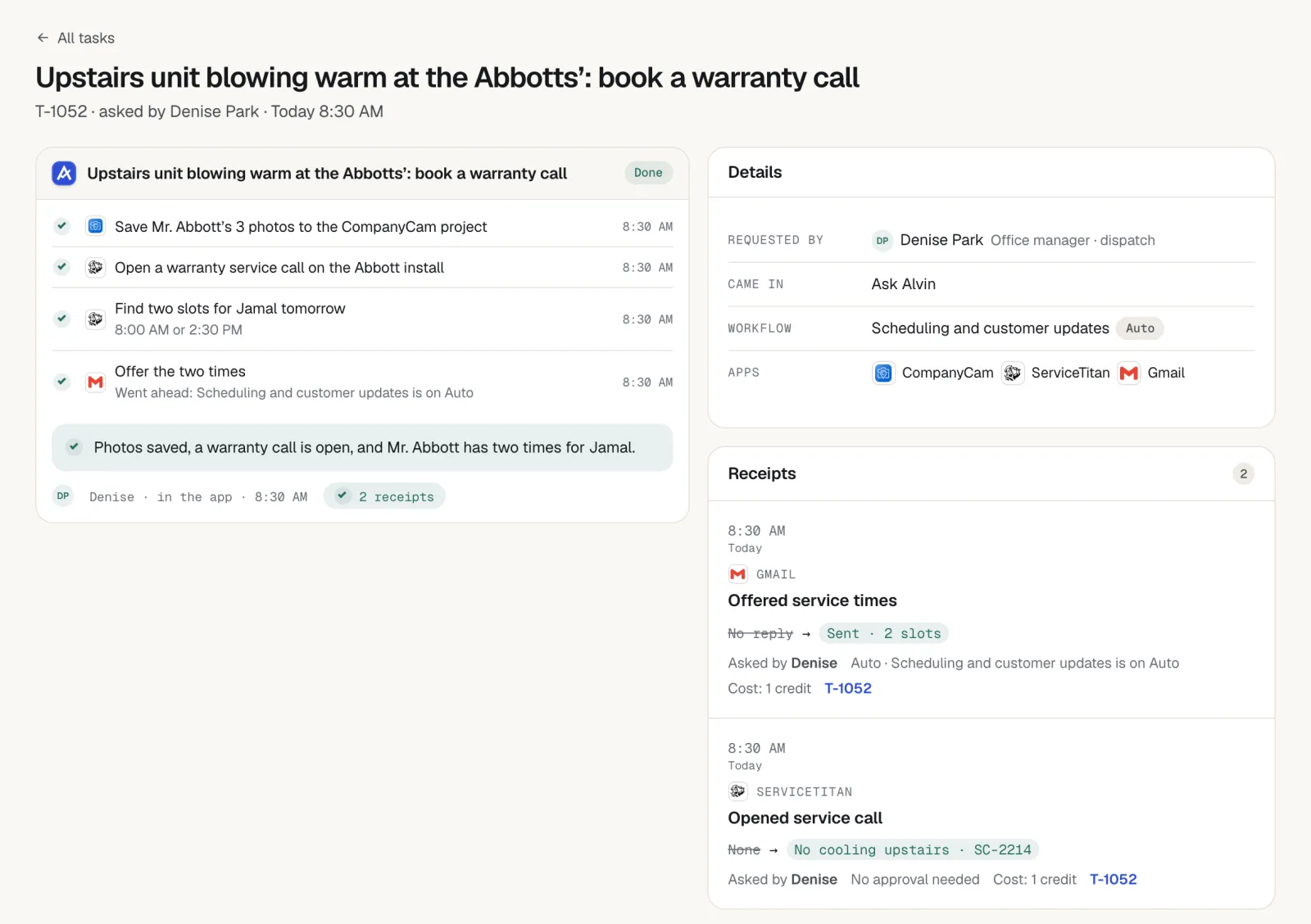
The team asks Alvin in the Alvin app or forwards an email. Alvin works in the apps you already use, and where there is no direct connection, uses a browser with logins saved in the vault. Staff never see the passwords.
| Alvin does | You do |
|---|---|
| Checks on a schedule for renewals due, registrations near their deadline, unpaid invoices and stale estimates | Set the roles, the spending limits and what needs approval |
| Builds parts carts on supply-house portals and holds them for approval | Approve the order. Your business is the buyer. |
| Fills in warranty registrations and rebate applications from the job record | Review and approve before submission |
| Drafts customer emails and texts from your own accounts, with opt-out and quiet-hours rules applied | Approve what goes to customers |
| Keeps a receipt for every action: who asked, who approved, what changed, with screenshots | Diagnose, size, price and do the licensed work |
| Sends a morning briefing of what needs attention | Answer the phone. Alvin has no phone line today. |
Alvin costs $99 a month on Standard or $299 a month on Pro, plus usage in credits.
Questions to ask any AI vendor
- Which of my apps does it work in, and what happens in the ones it does not?
- Can each person on my team have different permissions and limits?
- What can it do without a person approving? Can I change that?
- Where is the record of what it did, and can anyone edit that record?
- How are my logins stored, and who can see them?
- Does it ever hold or move my money?
- How is it priced, and what makes the bill go up?
Frequently asked questions
How are HVAC companies using AI?
Mostly for office work around the job: answering or returning missed calls, summarizing calls and job notes, drafting customer messages, chasing renewals and unpaid invoices, preparing parts orders and filing registrations. The technical work, from diagnosis to sizing, stays with trained people.
What is the best AI software for an HVAC company?
It depends on the gap you need closed. If calls go unanswered, look at call answering tools. If the work is inside your field service app, use its built-in features. If the work spans suppliers, manufacturers, QuickBooks and email, look at an assistant that works across apps, such as Alvin.
Can AI diagnose HVAC problems?
Not in a way a shop should rely on. A general assistant can explain what a symptom might mean, which helps training. Finding the fault on a real system takes measurements and a technician's judgment, and safety issues need a person immediately.
Can I use ChatGPT to run my HVAC office?
ChatGPT and similar assistants are useful for drafting, summarizing and thinking through a problem. They are designed around one person's conversation, so team roles, approval limits and a record of actions in your business apps are not what they are built for. Many owners use one for writing and a separate tool for the office work.
Is AI safe to use with customer information?
Ask each vendor how data and logins are stored, who can see them and whether your data is used to train models. Give each staff member only the access the job needs, and keep a person approving anything that spends money or contacts a customer. Do not paste payment card details or passwords into a chat window.
Start with the paperwork nobody wants.
Alvin handles renewals, registrations, parts orders and invoice follow-up across the apps your shop already uses, with your approval on the things that matter.