AI for electricians: what it does in a contractor's office
AI for electricians today is office help, not field help. It counts devices on plans, writes estimates and emails, answers the phone, summarizes jobs and fills in forms. It does not do load calculations you can sign, make code decisions or pull wire. The tools fall into five groups, covered below with what each is good at and where it stops. Alvin is in the fifth group: one assistant for the whole team that does the paperwork across the apps you already use.
On this page
The five kinds of AI tools for electrical contractors
Scroll sideways to see every column.
| Kind of tool | What it does | Where it stops |
|---|---|---|
| Estimating and takeoff tools | Count devices and fixtures and measure runs from plan sheets, and build a material list | Symbol counts need checking. Labor, conditions and pricing judgment stay with the estimator |
| AI inside field service apps | Features built into the app you run jobs in: job summaries, drafted messages, scheduling suggestions, reporting | Works only on what is inside that one app |
| Call answering tools | Answer the phone, ask intake questions, book or take a message | Only as good as the script. Unusual or upset callers need a person |
| General assistants (ChatGPT, Claude and similar) | Write and rewrite emails, proposals and policies, summarize documents, explain a spec, help with spreadsheets | They do not know your business unless you tell them, and by default they do not act in your apps |
| An assistant that works across apps for the team (Alvin) | Takes a request and does the office task in your accounting, CRM, permit portals and email, with approvals and a record | No phone line, and no licensed work |
Products change quickly and many now overlap. Check each vendor's site for current features and prices before you compare.
What each kind is good for
Estimating and takeoff. If you bid from plans, automated counting saves hours on commercial and multi-unit work. Treat the output as a first pass: spot-check counts against a sheet you know, and keep your own labor units. For residential service work with no drawings, a solid template matters more. See the electrical estimate template.
Field service app features. If you already run ServiceTitan, Housecall Pro, Jobber or a similar app, look at what is included before buying anything new. Built-in features see your job data without any setup. Their limit is the edge of the app: they will not log in to the city portal or your supply house.
Call answering. Missed calls are lost jobs, and software that answers at 9pm is better than voicemail. Test it as a customer would, including a hard call such as a burning smell at the panel, and check how it hands off to your on-call electrician. The options are compared in after-hours coverage for electricians.
General assistants. Good for anything you would otherwise write from a blank page: a scope description, a reply to a difficult email, a safety meeting outline, a job posting. Do not treat a code answer from a chat assistant as authority. Check the adopted code book and your inspector.
An assistant across apps. This is the newest kind. Someone on the team asks for a task in plain words, and the assistant does the steps in the systems involved, then waits for approval where money or a customer is involved.
What to hand over first
Start with paperwork that is repetitive, has a clear right answer and is easy for a person to check.
- Permit paperwork. Filling in applications from the job record, tracking issue dates, requesting inspections and checking that permits get closed. See electrical permit paperwork.
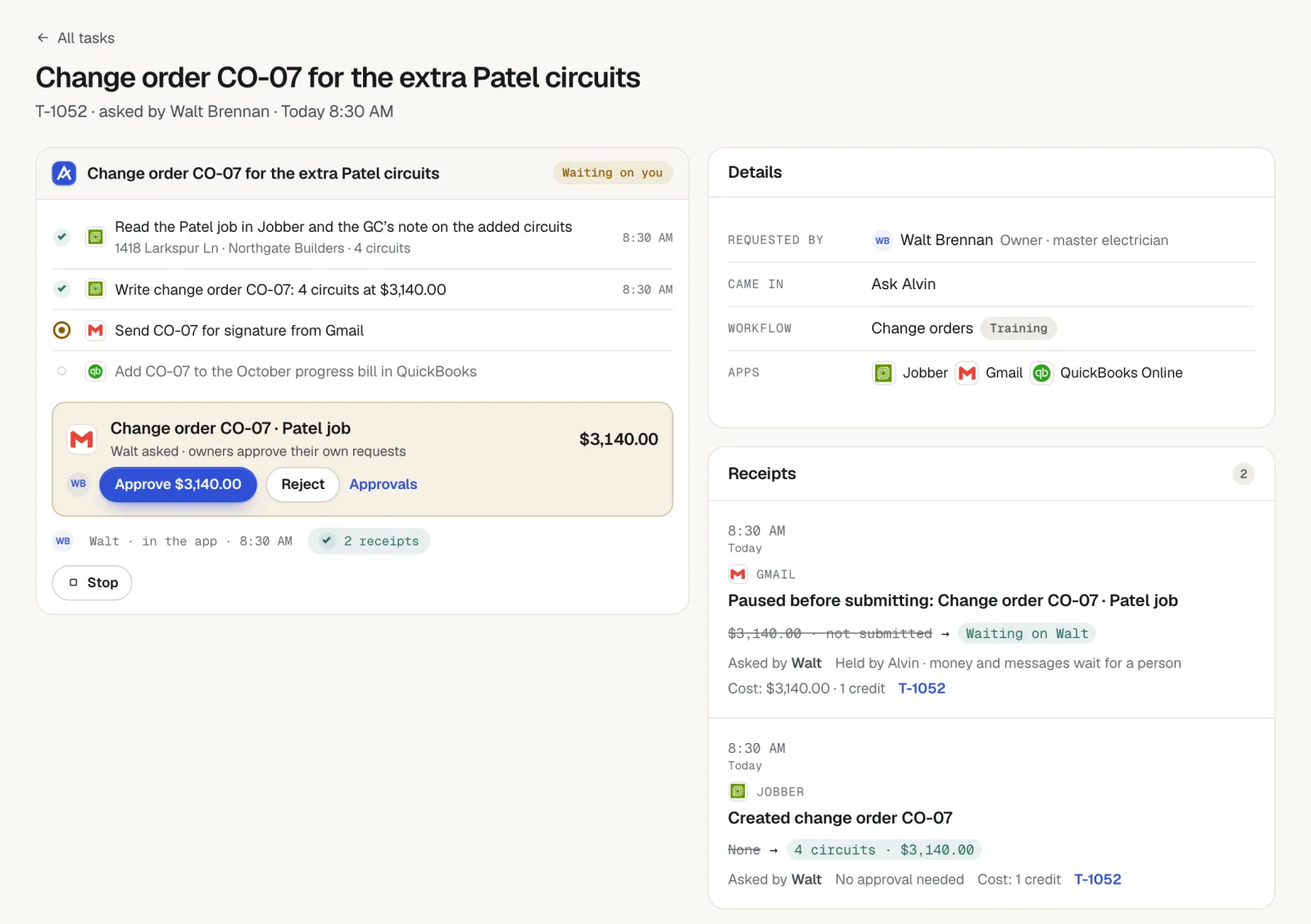
- Change orders. Writing up the added work from a crew lead's note and photos, pricing it from your price sheet and getting it to the customer for a signature before the work is done.
- Estimate follow-up. Finding estimates with no answer and drafting the next message.
- Invoice follow-up. Checking for unpaid invoices and drafting reminders with the payment link.
- The morning list. One summary of what came in overnight, what is waiting for approval and which deadlines are close.
Run each one with a person approving every item for the first few weeks. Loosen the limits only for the tasks that have been right every time.
What stays with the licensed electrician
- Load calculations and service sizing. Software can do arithmetic. The licensed person owns the inputs, the result and the signature.
- Code decisions. Which code edition applies, local amendments, and what the inspector will accept.
- Diagnosis and safety calls. Whether a panel is safe to leave energized is decided by a person on site.
- Scope and price. A tool can draft. The estimator decides what the job is and what it costs.
- Signatures. Permit applications, affidavits and contracts.
Licensing rules and what must be signed or sealed by a licensed person vary by state and city. Check your licensing board and building department. This article is general information, not legal advice.
Questions to ask any vendor
- Which of my apps does it work in, and how: a direct connection, or a login?
- Where are my passwords stored, and can staff or the software's operators see them?
- What can it do without a person approving? Can I set limits by person and by dollar amount?
- Is there a record of every action, and can anyone edit or delete it?
- What happens when it is unsure or wrong? Does it stop and ask?
- Does it send messages from my own email and number, and does it respect opt-outs and quiet hours?
- Is my data used to train models? Can I export or delete it?
- What does it cost at my volume: per user, per call, per task?
How Alvin fits
The team asks Alvin in the Alvin app or forwards an email. There is one Alvin for the owner, the office, crew leads and the bookkeeper, each with a role and limits. Alvin works in QuickBooks, your CRM or field service app, supply-house portals, city permit portals and your Gmail or Outlook. Where there is no direct connection, Alvin uses its own browser with logins saved in your vault, and staff never see the passwords.
Anything that spends money or reaches a customer waits for a person to approve. Every action has a receipt showing who asked, who approved and what changed, with screenshots. Alvin costs $99 a month on Standard or $299 a month on Pro, plus usage in credits.
What Alvin handles and what stays with you
| Alvin does | You do |
|---|---|
| Fills in permit applications in the city portal and tracks issue, inspection and closing dates | The licensed electrician signs and makes every code and load decision |
| Writes up change orders and estimates from your template and price sheet | Set scope and price, and approve before anything is sent |
| Checks for stale estimates and unpaid invoices on a schedule and drafts the follow-up emails and texts | Approve the messages. Make the phone calls: Alvin has no phone line |
| Builds supply orders in the supply-house portal and holds them for approval | Approve the order. You stay the buyer, and Alvin never holds or moves money |
| Remembers customers, jobs and prices, and shows the team what Alvin knows | Correct it when something changes |
| Sends a morning briefing of what is open, due and waiting on you | Decide the priorities for the day |
Frequently asked questions
How are electricians using AI?
Mostly in the office: counting devices on plans for takeoffs, drafting estimates and emails, answering and logging calls, following up on estimates and invoices, and filling in permit paperwork. The wiring, the diagnosis and the code decisions are still done by electricians.
Can AI do electrical load calculations?
Software can run the arithmetic, and a chat assistant can explain the method. The licensed electrician is still responsible for the inputs, the result and anything submitted to a building department or utility. Never file a calculation that a qualified person has not checked.
Will AI replace electricians?
Nothing available today installs a panel, troubleshoots a circuit or passes an inspection. What AI takes on is office work around the job: forms, follow-up, scheduling messages and summaries. For most shops that means the same crew spends less time on paperwork.
Is ChatGPT useful for an electrical contractor?
Yes, for writing and summarizing: scope descriptions, customer emails, job postings, meeting notes and spreadsheet help. It does not know your customers or prices unless you give it the details, and its code answers need checking against the adopted code and your local inspector.
What is the best AI tool for electrical contractors?
It depends on where your hours go. Shops that bid from plans get the most from takeoff tools. Shops losing calls should look at call answering. Shops buried in permits, change orders and follow-up need an assistant that works across their apps. Try any tool on real work before committing.
Hand over the paperwork first.
Permits, change orders and follow-up, done in your own apps with your approval on every step that matters. See what Alvin does for electrical contractors.