Google review request templates: how to ask for a review
The best way to ask for a Google review is to ask every customer, soon after the job is finished, in one short message with a direct link to your review page. Below are eight templates to copy: a text, an email, a reminder, an in-person script, versions for repeat and commercial customers, and replies to a 5-star and a negative review. Alvin drafts the request when a job closes and holds it for your approval.
On this page
When to ask for a Google review
Ask when the work is fresh and the customer has seen the result. For most trades that means the same day or the next morning.
- Service calls and repairs. Within a couple of hours of the technician leaving, once the invoice is settled.
- Installs and projects. After the final walkthrough and cleanup, not at the deposit stage.
- Recurring service. After a visit that solved something visible, or at a milestone such as the end of the first season.
- Insurance and warranty jobs. After the paperwork the customer was waiting on is closed.
Hold the request when there is an open complaint, an unpaid dispute or a callback on the schedule. Fix the problem first, then ask the same way you ask everyone else.
How to get your Google review link
- Sign in to the Google account that manages your Business Profile.
- Open your profile. Search for your business name on Google or open it in Google Maps while signed in.
- Find the option to ask for reviews. Google places it with the review tools on the profile and has labeled it differently over time.
- Copy the short link. Google also offers a QR code for the same link.
- Test it. Open the link on a phone that is not signed in as the business. It should land on the review box.
- Save it where the team can reach it. Message templates, invoice footer, a card in each truck.
Google changes these menus from time to time, so check Google's own help pages if a step looks different.
Review request templates you can copy
Each template uses a fictional customer and the bracketed link placeholder. Swap in your business name, the job and your own link.
| Template | Wording |
|---|---|
| 1. Text right after the job | "Hi Mrs. Henderson, this is Dave at Sample Heating & Air. Thanks for having us out today. If you have a minute, an honest Google review helps a small shop like ours a lot: [link]. Reply STOP to opt out." |
| 2. Email the next day | Subject: How did we do on your water heater? "Hi Mr. Patel, thank you for choosing Sample Plumbing Co. for your water heater replacement yesterday. If anything is not right, reply to this email and I will take care of it. If you were happy with the work, would you share your experience on Google? It takes about a minute: [link]. Thank you, Maria" |
| 3. Reminder, once, about a week later | "Hi Mr. Patel, Maria from Sample Plumbing Co. One quick reminder in case it slipped by: we would appreciate your honest review here: [link]. Either way, thanks again for your business." |
| 4. In-person script at the walkthrough | "Before I head out, is there anything you would like me to look at again? Good. We ask every customer for a Google review, because that is how most people find us. I will text you the link in a few minutes. Whatever you write, we read it." |
| 5. Repeat customer | "Hi Mrs. Garcia, thanks for having us back for the fall cleanup. You have been with Sample Landscapes Co. for three seasons now. If you have never left us a Google review, we would be grateful for one: [link]." |
| 6. Commercial client | Subject: A quick favor from Sample Electric Co. "Hi Priya, the lighting retrofit at the Elm Street building is closed out and the final documents are in your inbox. If the project went well from your side, would you be willing to leave a short Google review mentioning the type of work? [link]. If your company has a policy against reviews, no problem at all." |
Three habits make these work. Use the customer's name and the actual job. Send from a person, with a first name. Send one reminder at most, then stop.
Templates for replying to reviews
Replying shows future customers that someone is paying attention. Keep replies short and never include private details about the job, the price or the address.
| Template | Wording |
|---|---|
| 7. Reply to a 5-star review | "Thank you, Mrs. Henderson. Luis and the crew enjoyed working on your home, and I will pass your note along to them. Call us any time you need us." |
| 8. Reply to a negative review | "Mr. Smith, thank you for telling us. This is not the experience we want any customer to have. I am the owner and I would like to make it right. Please call me directly at 555-0118 or email dave@example.com so we can go over what happened." |
For a negative review, reply once, calmly, and move the conversation to a phone call. Do not argue the facts in public. If the review breaks Google's content rules (spam, the wrong business, abusive language), use Google's reporting tool instead of answering it in kind.
Google's rules for asking
Google publishes policies for reviews, and breaking them can get reviews removed or a profile restricted. In general terms:
- No incentives. Do not offer discounts, gift cards, drawings or anything of value in exchange for a review.
- No selective asking. Do not screen customers and send only the happy ones to Google. Ask everyone the same way.
- No fake or conflicted reviews. Owners, employees and family should not review the business, and you should not review competitors.
- No scripting the rating. Ask for an honest review, not "a 5-star review."
- No bulk solicitation tricks. Avoid review kiosks or shared devices set up to push customers through reviews on site.
Policies change, so read Google's current review policy before you set up a routine. If you ask by text, texting rules apply as well; see texting rules for contractors.
This article is general information, not legal advice. Google's policies and consumer protection rules on reviews and endorsements change. Check the current versions.
A simple routine for asking after every job
Most shops have few reviews because the asking depends on someone remembering. Tie it to something that already happens: the job being marked complete in the CRM or field service app.
- Trigger. Job closed and invoice sent or paid.
- Check. No open complaint or callback on the account, and the customer has not opted out of messages.
- Send. Template 1 or 2, within a day.
- Remind. Template 3, once, about a week later, only if no review appeared.
- Reply. Answer every new review within a few days.
- Share. Read good reviews to the crew. Technicians who hear their name in a review start asking on their own.
Trade-specific versions of this routine are in the plumbing and roofing review articles.
What Alvin handles and what stays with you
| Alvin does | You do |
|---|---|
| Sees the job close in your CRM or field service app and drafts the request with the customer's name and the job | Write the templates once, in your own voice |
| Holds each request for approval, then sends it by email or text under your own accounts, with opt-out and quiet-hours rules applied | Approve, edit or skip each request |
| Skips accounts with an open complaint or callback and tells you why | Fix the complaint and decide when to ask |
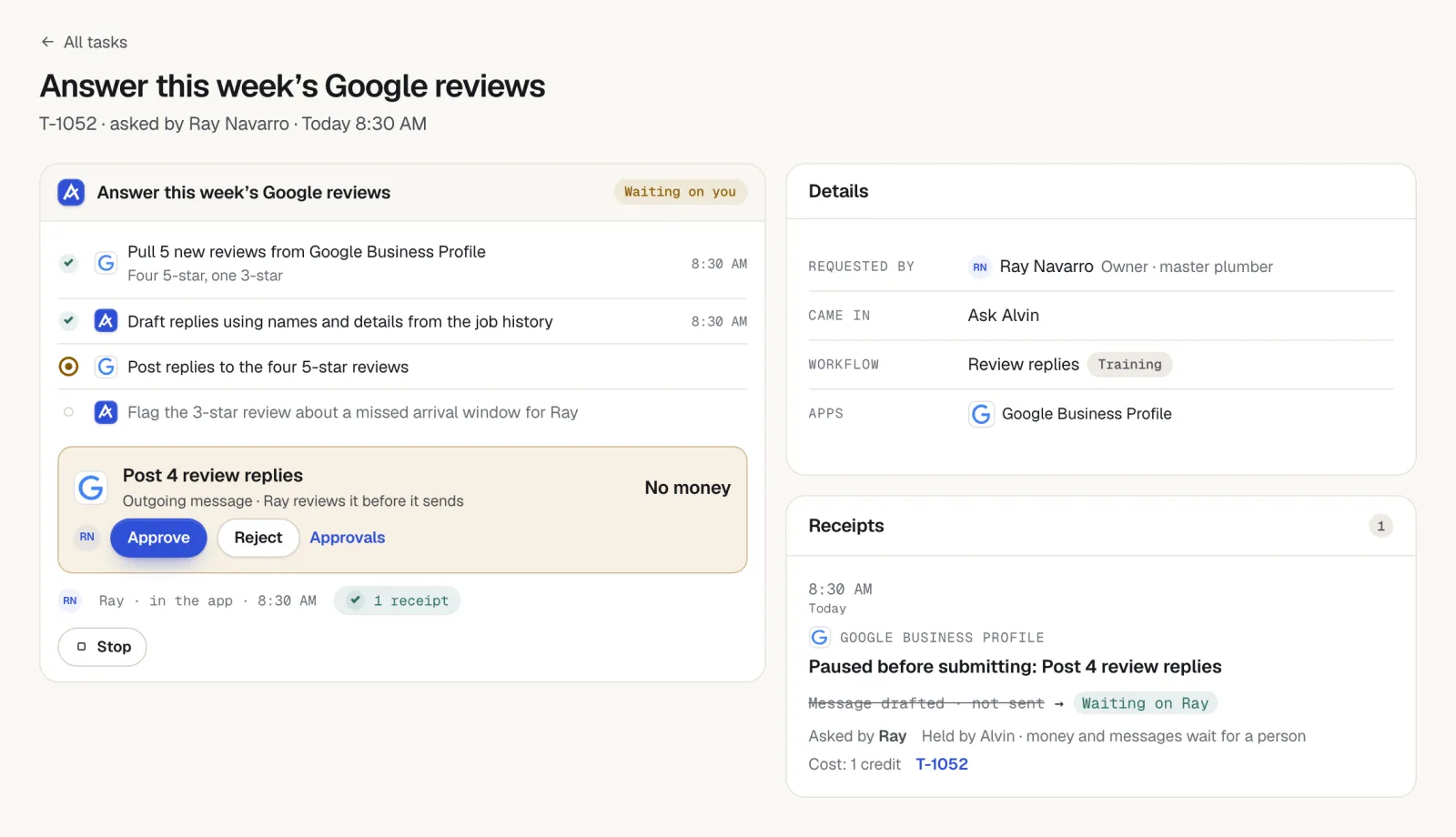
| Watches Google Business Profile for new reviews and drafts a reply for approval | Approve the reply, and call the unhappy customer yourself |
| Keeps a receipt of what was sent, to whom and who approved it | Do the work that earns the review |
Alvin asks every eligible customer the same way and never offers anything in exchange for a review.
To fill these in with your own customer and link, use the free Google review request generator.
Frequently asked questions
How do I ask a customer for a Google review?
Ask soon after the job is done, in a short personal message that names the job and includes a direct link to your review page. Ask for an honest review, not a specific rating. Send one reminder about a week later, then stop.
What is a good Google review request text message?
For example: "Hi Mrs. Henderson, this is Dave at Sample Heating & Air. Thanks for having us out today. If you have a minute, an honest Google review helps a small shop like ours a lot: [link]." Add an opt-out line and send it from your business number.
Can I offer a discount for a Google review?
No. Google's review policies prohibit offering incentives such as discounts, gift cards or prize drawings in exchange for reviews. Reviews gained that way can be removed. Check Google's current policy for the exact wording.
How do I get a link for customers to leave a Google review?
Sign in to the Google account that manages your Business Profile, open the profile, and use the option to ask for reviews. Google gives you a short link and a QR code. Test the link on a phone before you send it to customers.
Should I respond to negative Google reviews?
Yes, once and calmly. Thank the customer, say you want to make it right, and give a direct phone number or email to continue privately. Do not share job details or argue in the reply.
Ask every customer, without anyone having to remember.
In a pilot we connect Alvin to your job system and Google Business Profile. Each closed job produces a review request waiting for your approval.