Panel upgrade permit and paperwork: the service upgrade process
An electrical panel or service upgrade almost always needs a permit, and it usually involves four parties: the contractor, the building department, the utility and the customer. The paperwork runs in this order: load calculation, utility service request, permit application, disconnect scheduling, customer outage notice, inspection, reconnect and closeout. The exact order and forms depend on the city and the utility. Alvin fills in the forms and keeps the schedule, and the licensed electrician does the load calculation, the code decisions and the signatures.
On this page
Who is involved in a service upgrade
Scroll sideways to see every column.
| Party | What they control | What they need from you |
|---|---|---|
| Building department | The electrical permit and inspections | Application, license and insurance on file, scope, sometimes the load calculation or a one-line diagram |
| Electric utility | The meter, the service drop or lateral, disconnect and reconnect | A service request with the new service size, meter location, and often proof of permit or a passed inspection |
| Customer | Access, the outage window, payment | A signed estimate, a confirmed date, and notice of how long power will be off |
| Licensed electrician | Load calculation, design, code compliance, signatures | Site details, utility requirements, a clear schedule |
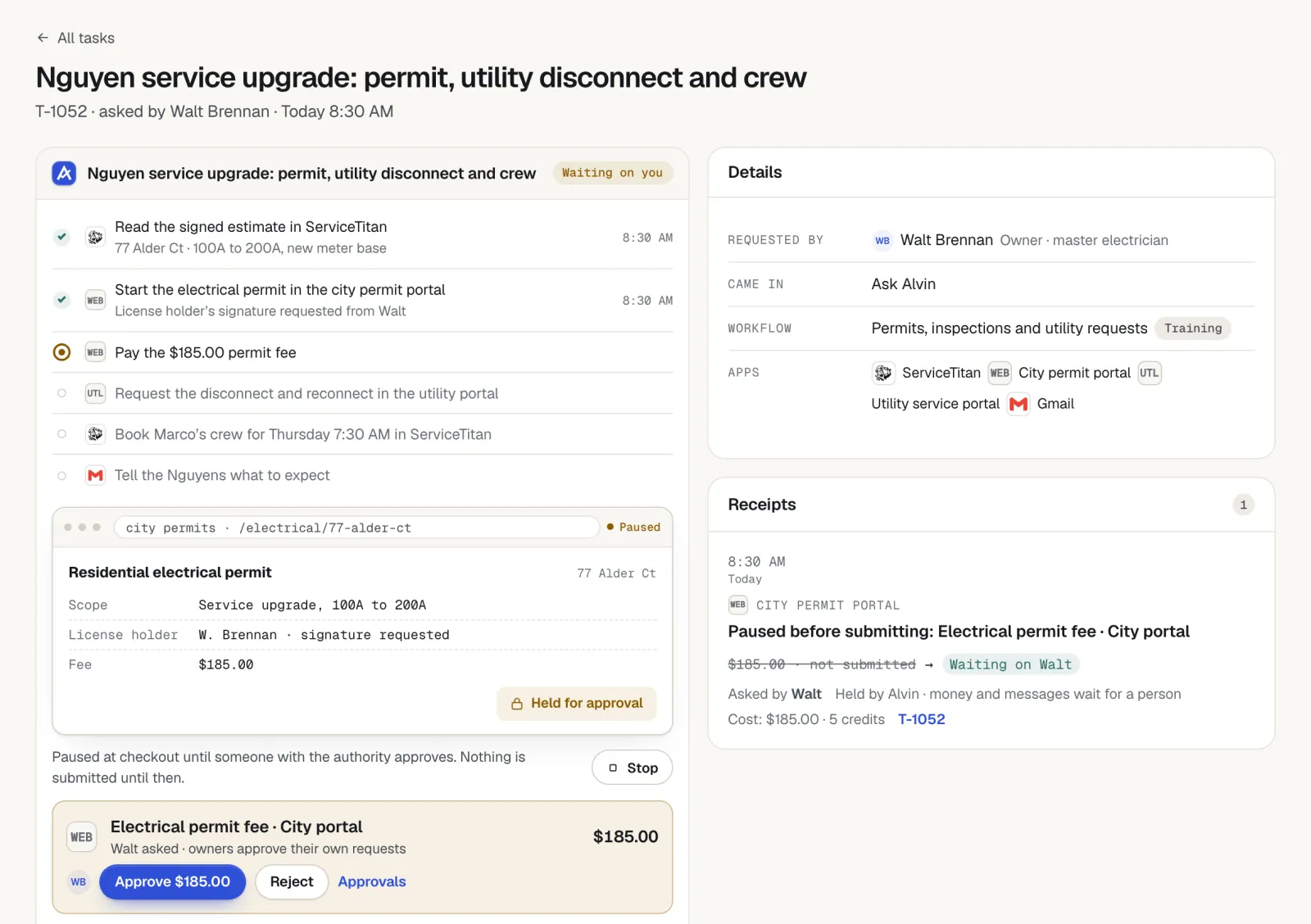
The electrical service upgrade process, step by step
- Site visit and load calculation. The electrician sizes the new service, checks the meter location against utility clearance rules and notes grounding and bonding work.
- Signed estimate and deposit. The scope names what is included: panel, meter base, mast, grounding, and any circuits being corrected.
- Utility service request. Submit the utility's application for a service change. Many utilities assign a work order number and a planner or coordinator. Some need to approve the meter location before work starts.
- Permit application. Apply through the building department's portal. Some departments issue service upgrade permits the same day, and others review them first.
- Schedule the disconnect. Book the utility for the day of the work. Lead times range from days to weeks depending on the utility and the season.
- Notify the customer of the outage. Confirm the date, the hours without power and what to prepare.
- Do the work. Swap the equipment, label the panel directory and take photos before the cover goes on.
- Inspection. Request the inspection for the same day if the department allows it. In many areas the utility will not reconnect until the inspector approves the work and sends a release.
- Reconnect. The utility restores power and sets or reseals the meter.
- Closeout. Confirm the permit shows as finaled, send the final invoice and file the documents.
Permit requirements, utility procedures, who may cut and reconnect service, and inspection sequencing vary by city, state and utility. Check with the building department and the utility serving the address. This article is general information, not legal advice.
Where the schedule slips
- The utility request went in late. The permit took a day and the utility took three weeks. Submit the utility request first, or the same day as the permit.
- The inspection and the reconnect were not lined up. The work is done by 2pm, the inspector comes tomorrow and the family has no power overnight. Ask the department about same-day inspections for service changes before you set the date.
- The release never reached the utility. The inspection passed but the utility has not received the approval. Someone has to confirm it arrived.
- The meter location was not approved. The utility rejects the new location after the equipment is on the wall.
- The customer was not ready. A home office, a medical device, a full freezer or a tenant nobody told.
- The permit stayed open. Power is back, everyone moves on and the final never gets recorded.
The customer outage notice
Send it when the date is confirmed and again the day before. Wording you can copy, with a fictional customer and example times:
"Hi Mrs. Henderson, your panel upgrade is confirmed for Thursday the 12th. Power to the whole house will be off from about 8am to 4pm. Before we arrive, please: charge phones and laptops, keep the fridge and freezer closed during the outage, shut down computers, and clear 3 feet in front of the panel and the meter. Power comes back after the city inspection and the utility reconnect, and we'll text you when it is on. If anyone in the home depends on powered medical equipment, please call us today at [number]."
If the reconnect could slip to the next day in your area, say so before the job, not at 5pm on the day.
A tracking table for each upgrade
One row per item, per job. Review open upgrades twice a week.
Scroll sideways to see every column.
| Item | What to record | Owner |
|---|---|---|
| Load calculation | Date done, new service size, where the file is saved | Licensed electrician |
| Signed estimate and deposit | Date signed, deposit received | Office |
| Utility service request | Date submitted, work order number, planner name and contact | Office |
| Meter location approval | Approved (yes or no), date | Electrician and utility |
| Permit | Number, date applied, date issued, fee paid, expiration | Office |
| Disconnect appointment | Date, time window, confirmation number | Office |
| Customer outage notice | Date sent, date confirmed by customer | Office |
| Inspection | Date requested, date held, result, corrections | Electrician |
| Release to utility | Date sent by the department, date the utility confirmed it | Office |
| Reconnect | Date and time power was restored | Utility |
| Closeout | Permit finaled, photos filed, final invoice sent | Office |
Final documentation to keep
- The load calculation and any diagram submitted.
- The issued permit and the final inspection record.
- The utility work order and reconnect confirmation.
- Photos: old equipment, new panel with the cover off, the labeled directory, grounding and bonding, the meter base.
- The signed estimate, any change orders and the final invoice.
Give the customer a copy of the permit final and the panel directory. For the permit side on smaller jobs, see electrical permit paperwork. For pricing the upgrade, see the electrical estimate template.
What Alvin handles and what stays with you
| Alvin does | You do |
|---|---|
| Fills in the permit application and the utility service request in their portals from the job record, using logins saved in your vault | The licensed electrician does the load calculation, decides the design and signs |
| Holds permit and utility fees for approval before anything is paid | Approve fees within limits the owner sets. You stay the buyer |
| Tracks every date in the table and flags conflicts, such as a disconnect booked before the permit is issued | Decide the work date and crew |
| Drafts the outage notice and the day-before reminder, held for approval | Approve the messages and take the customer's calls. Alvin has no phone line |
| Requests the inspection in the portal and checks whether the permit shows as finaled | Meet the inspector and fix any corrections |
| Files the documents and photos on the job and keeps a receipt, with screenshots, of each step | Answer for the work. Alvin does the paperwork, never the licensed work |
Frequently asked questions
Do you need a permit for an electrical panel upgrade?
In most places, yes. Replacing a panel or increasing the service size is permitted work with an inspection. Requirements and fees are set locally, so check with the building department for the job address.
How long does a panel upgrade take from start to finish?
The work itself is often done in a day. The paperwork around it takes longer: utility scheduling and permit review can add anywhere from a few days to several weeks, depending on the utility, the department and the season. Ask both for current lead times before you promise the customer a date.
Who schedules the utility disconnect for a service upgrade?
Usually the electrical contractor submits the service request and books the disconnect and reconnect with the utility. Some utilities require the customer of record to authorize the request. Check the utility's process for service changes.
Does the inspection happen before or after power is reconnected?
In many areas the inspection comes first, and the utility reconnects only after the building department sends a release. Other areas allow a same-day reconnect with the inspection to follow. Confirm the sequence with both the department and the utility for each jurisdiction you work in.
How long is the power off during a panel upgrade?
Plan for most of a working day, and tell the customer it can run longer if the inspection or reconnect is delayed. Give a time window in writing, a list of what to prepare and a number to call.
Four calendars, one list.
Alvin files the permit and utility forms, tracks the dates and drafts the outage notice. The electrician signs. See what Alvin does for electrical contractors.